
Enscape 4.14.0 представляет новый браузер освещения и функционал генерации материалов, улучшает эффекты моделей травы и обновляет интерфейс для совместного использования сцен, рендереров и многое другое. Также исправлены многочисленные ошибки, связанные с обработкой материалов, рендерингом видов в нескольких программах, работой библиотеки ресурсов, а также устранены известные сбои и другие проблемы.
Новые функции
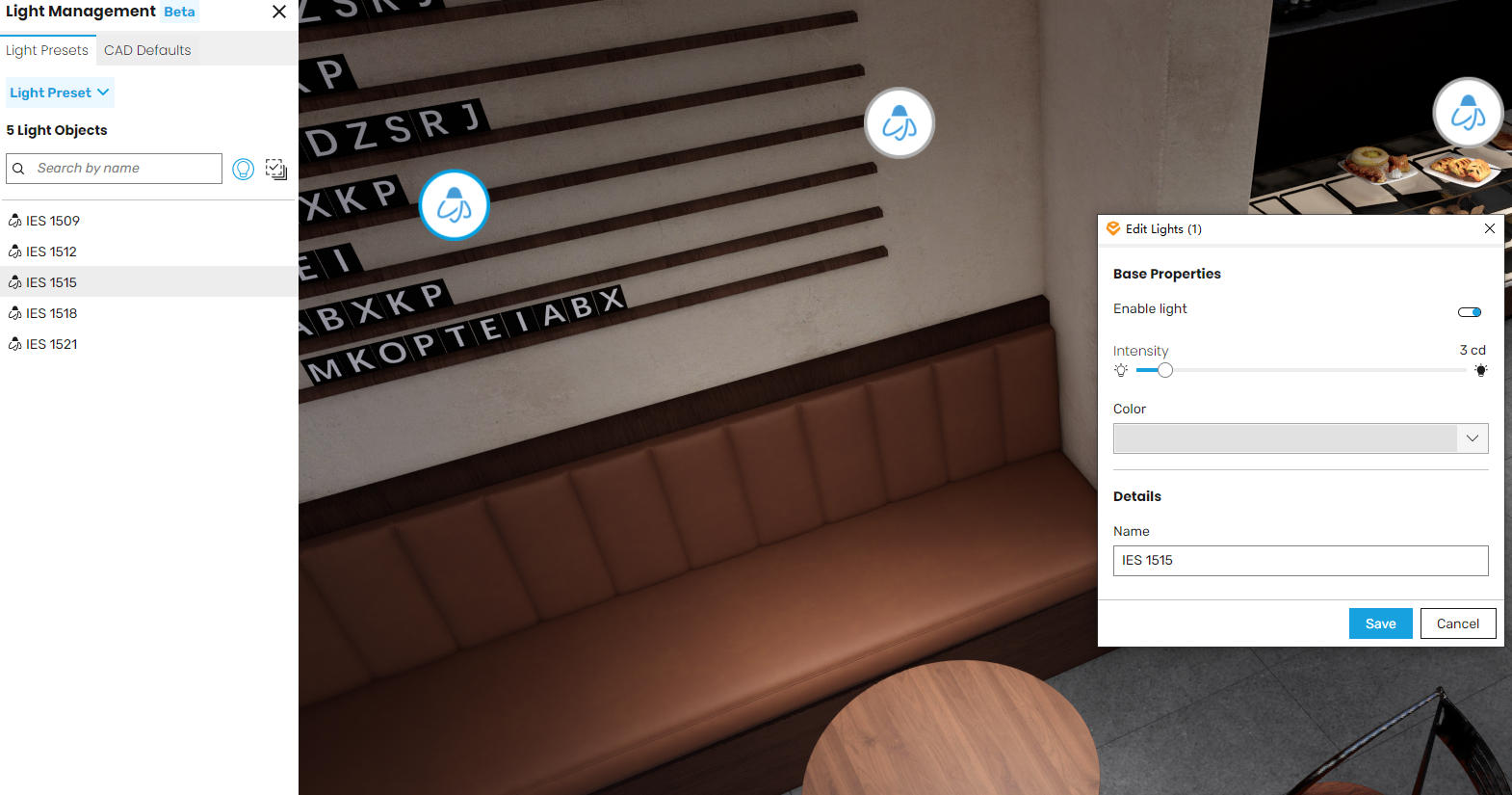
- Интерфейс управления освещением
Новый браузер управления освещением позволяет напрямую настраивать свойства света в Enscape. Используя предустановки освещения, вы можете управлять интенсивностью, цветом и состоянием включения/выключения света, сохраняя исходные значения CAD. Поддержка множественного выбора и пропорционального масштабирования обеспечивает эффективную работу в больших сценах. Предустановки можно сохранять для каждого вида, что позволяет одному и тому же источнику света создавать различные световые эффекты в разных сценах для формирования уникальной атмосферы и облегчения принятия точных решений по освещению.
Примечание: Менеджер освещения в настоящее время выпущен как бета-версия, некоторые функции все еще находятся в разработке. Ваши отзывы крайне важны для улучшения и расширения этого функционала в будущих выпусках.
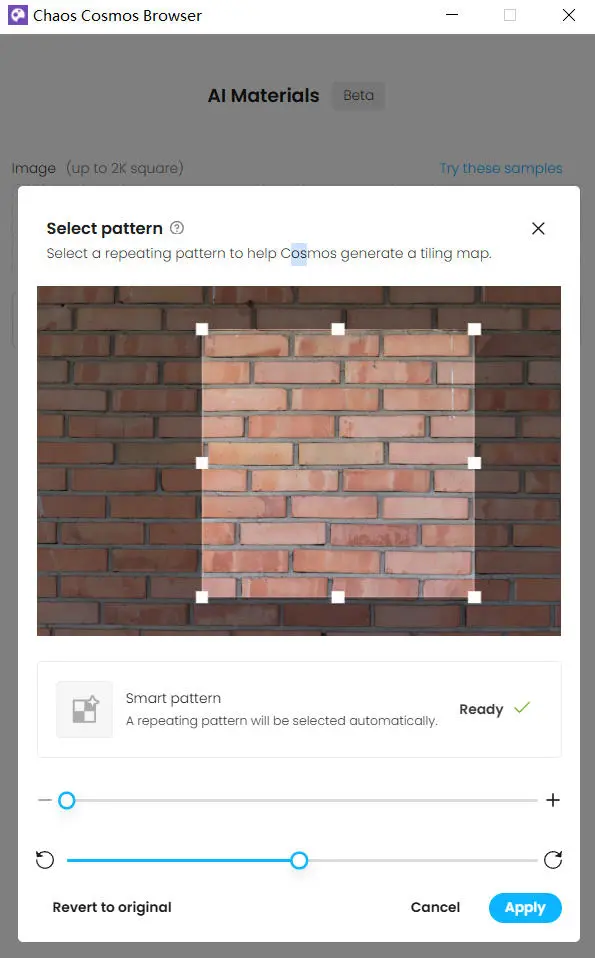
- Генерация материалов через Cosmos (бета)
Теперь вы можете генерировать материалы непосредственно из изображений в редакторе материалов Enscape. После нажатия кнопки «Сгенерировать материал» появится простое окно Cosmos, позволяющее загрузить фотографии или текстуры, и Enscape вернет готовый материал, содержащий все карты. Новый материал автоматически появится в вашем редакторе, позволяя вам беспрепятственно продолжить проектирование. Эта ранняя бета-версия в первую очередь ориентирована на скорость и удобство, с планами по добавлению большего количества функций в будущих выпусках.
- Добавлена более детализированная модель травы с геометрическими вариациями в разных диапазонах высоты. Это повышает реалистичность при близком рассмотрении, особенно для высокой травы.
- Улучшена обработка краев травы: Травяные поверхности теперь более естественно сливаются на краях. Высота и плотность плавно уменьшаются к краям, что снижает видимость низкополигональных областей и ненужное перекрытие с соседними поверхностями. Это создает более четкие и естественные границы травы.
- Экспорт детального отчета Impact: Обновлены заголовки во всех таблицах. Пространственные данные переименованы в данные помещений для соответствия терминологии интерфейса. Единицы измерения энергии на отопление и охлаждение исправлены на киловатт-часы. Добавлены единицы измерения для уставок охлаждения. Также исправлены единицы измерения для плотности размещения людей, явных и скрытых теплопоступлений.
- Обновления интерфейса экспорта и совместного использования сцен V-Ray: Интерфейс экспорта и совместного использования сцен обновлен. Заголовок окна «Поделиться сценой» теперь — «3D-стриминг». Кнопка экспорта сцены V-Ray имеет обновленную иконку и измененную всплывающую подсказку, а заголовок окна экспорта теперь — «Экспорт сцены».
Исправленные ошибки
- Материалы: Устранена ошибка, возникавшая при обработке текстур с именами, содержащими определенные комбинации специальных символов.
- Исправлена проблема, при которой недопустимые для имен файлов Windows символы в названиях материалов/текстур препятствовали сохранению связанных текстур в файловую систему при экспорте.
- Revit: Исправлено некорректное отображение элементов при применении нескольких фильтров-переопределений в виде.
- Revit: Исправлена ошибка, при которой составные стены не отображали графические наложения на основе фильтров выбора.
- Revit: Некорректное отображение декалей на определенной геометрии.
- Revit: Исправлено некорректное отображение графических наложений для контуров стен и подобных декоративных элементов.
- Revit: Исправлена ошибка, при которой некоторые элементы (например, окна) не отображали корректно эффекты графических наложений фильтров.
- Исправлен сбой в SketchUp 2026 при удалении сцен.
- SketchUp: Исправлен сбой при одновременном удалении связанных объектов.
- Библиотека ресурсов: Устранено возможное дублирование ресурсов при закрытии библиотеки после применения изменений.
- Библиотека ресурсов: Исправлена ошибка, при которой редактор ресурсов не отображал пользовательские параметры для настраиваемых материалов.
- Пользовательский редактор ресурсов: Исправлена проблема, препятствовавшая переключению с Enscape на пользовательский редактор ресурсов при включенной активации пакетного импорта.
- Пользовательский редактор ресурсов: Устранены сбои, возникавшие при навигации с помощью клавиши Tab после редактирования параметров ресурса.
- Настройки окна: Исправлена ошибка, при которой Enscape не запускался при использовании недопустимых пользовательских значков.
- Исправлена неработающая вращение мышью после подключения игрового контроллера.
- Рендерер: Исправлены проблемы с затенением, вызванные DLSS или автоматической субдискретизацией, в основном заметные вдоль краев геометрии.
- Отключено трассированное лучей искусственное освещение на видеокартах AMD из-за связанных с драйверами визуальных артефактов и нестабильности. Будущие обновления драйверов AMD могут решить эту проблему.
- Совместное использование сцены: Устранены редкие сбои, которые могли возникать при закрытии кнопки «Поделиться сценой».
- Совместное использование сцен: Исправлены сбои, вызванные отсутствием профилей облачного клиента.
- Рендерер: Устранено периодическое исчезновение курсора мыши после взаимодействия с другими окнами Enscape.
- Исправлено остаточное отображение контекстного меню в библиотеке ресурсов после применения преобразований к ресурсам.
- Исправлена блокировка ввода с клавиатуры после отображения любого наложения (например, диалоговых окон скриншотов или изменения ресурсов) в рендерере.
- Рендерер: Исправлено появление множественных зеркальных отражений на темных стеклянных материалах на фоне неба.
- Совместные аннотации: Устранена проблема, при которой вкладка совместных аннотаций становилась недоступной после создания скриншотов.
- «Поделиться сценой (3D-стриминг): Теперь проверяется, установлен ли клиент Chaos Cloud в системной учетной записи. Если он не установлен, появится сообщение об ошибке, указывающее, что клиент должен быть установлен перед продолжением».
- Экспорт: Исправлены артефакты в виде черных пикселей, возникавшие при экспорте в формате JPEG.
- Лицензия: При попытке получения лицензии (например, при открытии рендерера) Enscape завершался аварийно примерно через 1 минуту, если лицензионный сервер был недоступен (например, из-за сетевого сбоя или ошибки конфигурации). Это исправление полностью предотвращает такой сценарий.
- Трава: Исправлены разрывы в травинках при определенных комбинациях настроек.
- Трава: Исправлено исчезновение теней травы с земли при определенных углах камеры.
- Улучшены эффекты теней от травы.
- Исправлена проблема, при которой изменения цвета материалов Enscape перезаписывали модификации материалов Envision.
- Impact: Устранена проблема в детальных отчетах Impact, где отображались идентификаторы профилей вместо описательных имен.
- Исправлена невозможность отменить первоначальное изменение названий помещений.
- Scope: Исправлено некорректное отображение сообщения об ошибке при анализе пустых проектов SketchUp.
- Impact: Панель анализа теплового комфорта сохраняла результаты предыдущего анализа после отмены нового анализа.
- Impact Исправление: Устранена проблема, при которой результаты анализа помещений на тепловой комфорт не становились недействительными (не затенялись серым) после изменения типа помещения.
- Анализ Impact: Исправлена проблема, при которой выбранные типы помещений игнорировались.
Известные проблемы
- Сбои Enscape при создании (ресурсоемких) скриншотов: При рендеринге больших скриншотов (например, 4K с искусственным освещением или 6K без него) PathTrace.glsl может завершаться сбоем из-за чрезмерной нагрузки на GPU.